A hybrid library is an advanced library model that blends traditional physical resources with modern digital technologies to offer a comprehensive and flexible information environment. Unlike conventional libraries, which focus primarily on physical collections, hybrid libraries allow users to access print materials like books and journals and digital resources such as e-books, online databases, and multimedia content. This integration creates a seamless experience where users can transition effortlessly between the two formats, depending on their needs. In a hybrid library, technology plays a key role, often incorporating digital catalogs, self-checkout kiosks, RFID systems, and interactive displays to enhance access and usability. The hybrid model maximizes the availability of diverse resources and supports remote learning, research, and collaboration. By combining the strengths of both physical and electronic formats, hybrid libraries are well-suited to meet the evolving demands of today’s users, offering them greater flexibility, accessibility, and convenience in their information-seeking journey.
What is a Hybrid Library?
A hybrid library is a modern library model that integrates both traditional physical resources and digital technologies, creating a seamless and versatile environment for information access. In a hybrid library, users can explore a combination of printed materials, such as books, journals, and magazines, alongside electronic resources like e-books, online databases, and multimedia content. This hybrid approach bridges the gap between the physical and digital worlds, offering the flexibility for users to engage with the format that best suits their needs at any given time.
The hybrid library utilizes various technologies to enhance the user experience, such as digital catalogues, self-checkout kiosks, RFID systems, and interactive displays. These tools make it easier to manage and navigate both physical and digital collections efficiently. By incorporating both traditional and modern elements, hybrid libraries are able to cater to diverse user needs, offering access to a broader range of information resources and supporting different learning and research preferences. Moreover, hybrid libraries enable remote access to digital materials, making it easier for users to access information anytime, anywhere, regardless of location. As information consumption continues to evolve, hybrid libraries are crucial in providing accessible, adaptable, and inclusive environments for knowledge sharing and discovery.
Features of a Hybrid Library
A hybrid library is an advanced and innovative model that integrates both traditional physical resources and modern digital technologies to create a versatile and user-friendly information environment. This model seeks to bridge the gap between the analog and digital worlds, providing users with a seamless experience in accessing a wide range of resources. From books to e-books and printed journals to online databases, hybrid libraries offer a diverse array of materials to meet the needs of users in the digital age. Some key features of a hybrid library include:
- Integration of Physical and Digital Resources: A core characteristic of a hybrid library is its ability to offer both physical and digital resources in a unified way. Traditional libraries are often focused on physical collections such as books, journals, and manuscripts. However, with the rise of digital technologies, many libraries have expanded their offerings to include e-books, online databases, audio and video materials, and other digital formats. A hybrid library allows users to access physical books in the traditional manner while simultaneously offering the convenience of accessing online content. This integration ensures that users can find the information they need in whatever format they prefer, whether it’s print or digital.
- Digital Catalogues and Search Systems: Digital catalogs play an essential role in hybrid libraries by providing a centralized, searchable database that helps users locate both physical and digital materials. In a traditional library, users would manually search through card catalogs or browse shelves to find resources. In a hybrid library, the catalog system is digitized, allowing for quick searches of books, articles, digital collections, and multimedia content. Advanced search filters help users find specific materials, and the catalog can link users directly to e-books, online journal articles, or other resources available through the library’s website or third-party platforms. This feature significantly improves the efficiency of the library’s services, making resource discovery faster and more comprehensive.
- Self-Checkout Systems: Self-checkout kiosks are an increasingly common feature in hybrid libraries, where users can borrow physical materials such as books and DVDs without the assistance of library staff. These kiosks typically use RFID (Radio Frequency Identification) tags or barcode scanners to identify materials and check them out to the user. The self-checkout system is often linked to the library’s database, updating automatically to ensure the accurate tracking of borrowed materials. Self-checkout is not only more convenient for users, but it also frees up library staff to assist with more complex tasks. It’s particularly beneficial in reducing wait times and improving the overall efficiency of library operations.
- RFID Technology: RFID technology is a key feature in modern libraries, including hybrid libraries, for managing both physical and digital resources. RFID tags are placed on library items (such as books, DVDs, and other materials), allowing for quick and easy identification and tracking. RFID gates are typically placed at library entrances to prevent theft and ensure that only properly checked-out items leave the library. RFID-enabled systems also streamline inventory management by allowing staff to scan the entire shelf of materials in a matter of minutes, making it easier to monitor stock levels and find misplaced items. RFID technology enhances the user experience by providing more accurate and efficient management of physical collections.
- Online Access to Resources: In a hybrid library, one of the most significant advantages is remote access to digital resources. This includes e-books, online journals, research databases, and multimedia content, all available through the library’s website or specialized platforms. Users can access these resources from any location, at any time, without the need to visit the physical library. This is particularly beneficial for students, researchers, and remote learners who require consistent access to up-to-date information. Additionally, hybrid libraries may offer access to subscription-based services like JSTOR, ProQuest, or other academic databases that enhance the breadth of available materials.
- Interactive Displays: Interactive displays are a modern feature in hybrid libraries that improve user engagement and help with navigation. These digital screens or touch panels are strategically placed around the library to display useful information, such as library catalogs, news, events, and announcements. Some interactive displays also allow users to search for resources directly, showing real-time availability and helping them navigate the library’s collection. This interactive component enhances the user experience by providing intuitive ways to access information, and it can also provide additional resources such as multimedia content or virtual tours of the library.
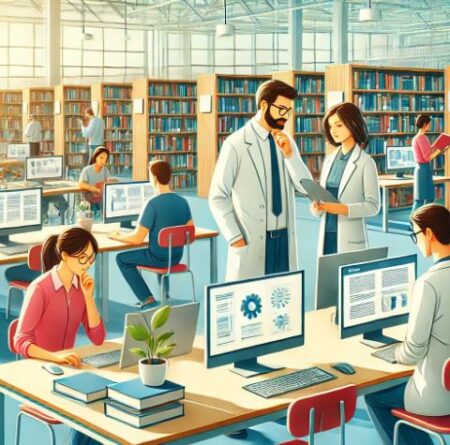
- Collaboration and Learning Spaces: Hybrid libraries often emphasize the creation of flexible spaces for collaboration and group work. These spaces are equipped with digital technologies, such as computers, projectors, and digital whiteboards, which foster an interactive learning environment. By combining physical spaces with access to digital resources, users can work together on projects, conduct research, and utilize digital materials in their learning. These spaces often cater to both individual and group needs, with quiet areas for study and collaborative spaces for team projects. The ability to access both physical and digital resources in these spaces creates an adaptable and effective learning environment.
- User-Centric Design: A hybrid library is designed with the needs of its users in mind. The space layout, resources, and technology are all created to provide easy access to both physical and digital materials. Traditional bookshelves may be complemented by digital terminals or computer stations where users can access e-books and online databases. The overall design promotes a seamless experience where users can move between the physical and digital worlds without confusion. Additionally, many hybrid libraries incorporate features like comfortable reading areas, designated spaces for meetings, and quiet zones that cater to various user needs. This user-centric design ensures that patrons have the flexibility to choose the environment and tools that best support their information-seeking behavior.
- Mobile Integration: With the rise of smartphones and tablets, mobile integration has become an essential feature of hybrid libraries. Many hybrid libraries offer mobile apps or websites that allow users to browse catalogs, check out materials, reserve items, and access digital resources directly from their devices. This added layer of accessibility makes the library’s resources available on the go, allowing users to search for information, borrow books, or access e-journals from anywhere. The mobile integration also enhances the library’s usability, particularly for users who may be unable to visit the physical library but still need access to its digital resources.
- Support for Digital Preservation: In hybrid libraries, the preservation of both physical and digital resources is a key concern. Digital preservation strategies ensure that e-books, databases, and other online content are properly maintained, backed up, and updated. Libraries may use digital repositories to store valuable information and make sure it remains accessible over time. In addition, hybrid libraries often have strategies in place to preserve physical materials by managing environmental conditions and handling items with care. This combined focus on digital and physical preservation ensures that both formats of knowledge remain available for future generations, even as technology evolves.
Hybrid libraries are a reflection of how modern libraries are evolving to meet the diverse needs of today’s users. Combining traditional physical collections’ strengths with the flexibility and convenience of digital technologies, hybrid libraries provide a comprehensive, user-centric environment for research, learning, and collaboration. These libraries are poised to play a crucial role in the future of information access, supporting a wide range of activities from academic research to personal development. The blend of physical and digital resources ensures that users have the tools they need to succeed in an increasingly digital world.
How does a Hybrid Library differ from a Traditional Library?
A hybrid library differs from a traditional library in several key ways, primarily related to the integration of digital technologies and the variety of resources offered. Below are the main differences:
| Aspect | Traditional Library | Hybrid Library |
|---|---|---|
| Resource Formats | Primarily focuses on physical resources, such as books, journals, magazines, and other printed materials. Users rely on browsing shelves, card catalogs, and physical indexes to find materials. | Integrates both physical and digital resources. In addition to traditional printed materials, hybrid libraries offer digital resources like e-books, online databases, multimedia content, and digital journals. This combination allows users to access information in a format that best suits their needs, whether it’s physical or digital. |
| Technology Integration | Typically uses minimal technology, with physical card catalogs, paper-based systems for tracking books, and manual processes for borrowing and returning items. The focus is largely on the physical space and materials. | Embraces a wide range of modern technologies. These libraries often have digital catalogs, self-checkout kiosks, RFID systems for inventory management, and digital interfaces for accessing online resources. Technology is a key enabler of the hybrid library’s ability to integrate physical and digital resources seamlessly. |
| Access to Resources | Users must physically visit the library to access materials, and resources are typically only available during library hours. The library space is the main medium through which information is accessed. | Allows for remote access to digital resources such as e-books, online journals, and research databases, enabling users to access materials anytime and anywhere. While physical materials require a visit to the library, digital resources can be accessed from home, school, or other locations, making hybrid libraries more flexible and accessible. |
| User Experience | The user experience is largely based on physical interactions, such as browsing the shelves, checking out materials at the circulation desk, and reading physical books. The environment is typically quieter and more focused on individual study. | In addition to traditional browsing, hybrid libraries offer interactive experiences through digital displays, self-checkout systems, and online research tools. These libraries often have spaces designed for collaboration, where users can work together while accessing both physical and digital resources. The focus is not just on individual study but also on community learning and digital engagement. |
| Cataloging and Information Retrieval | Uses physical card catalogs or paper-based systems to catalog resources. Information retrieval requires users to manually search for materials based on author, title, or subject, often with limited search capabilities. | Uses digital catalogs and integrated search systems, enabling users to search across both physical and digital collections. Digital catalogs often include advanced search filters, such as keyword search, subject tags, or access to full-text resources, making it easier for users to find relevant materials. |
| Management of Collections | Collection management is primarily focused on maintaining physical materials, such as books and magazines, with manual checks for availability and condition. Organizing and tracking the collection often requires manual efforts. | Combines physical and digital collection management. Digital resources require ongoing maintenance, including updates, backups, and format preservation. Physical items are still tracked, but digital systems like RFID are used for more efficient management and automated inventory tracking. |
| Support for Remote Learning and Research | Access to resources is limited to the library’s physical space and operating hours. Remote learning and research are challenging since resources are not easily available outside the library. | Hybrid libraries support remote learning by offering digital resources that can be accessed online at any time. They are ideal for distance learning, as users can engage with library content without needing to be physically present in the library. Hybrid libraries also often provide virtual reference services and digital research support. |
| Space Design | The library space is designed primarily for quiet reading, study, and the management of physical collections. There are typically designated areas for different materials like books, magazines, and journals. | The design of a hybrid library incorporates both physical and digital spaces. It includes areas for quiet reading, collaborative workspaces with access to digital technologies, computer stations for online research, and possibly multimedia rooms for digital learning. The layout supports a flexible and dynamic use of space for both traditional and tech-driven activities. |
| User Interaction with Resources | Interaction with library resources is mostly manual. Users physically browse shelves, check books in and out at the circulation desk, and rely on librarians for assistance. | In addition to physical browsing, hybrid library users can interact with digital systems, like self-checkout kiosks, search screens, and virtual reference tools. They can easily check out digital books, reserve physical materials online, and access virtual assistance or research help. |
| Preservation of Resources | Preservation efforts in traditional libraries focus on maintaining physical materials through careful handling, climate control, and proper storage. | While hybrid libraries still emphasize the preservation of physical materials, they also engage in the digital preservation of e-books, journals, and other digital assets. This requires ensuring long-term access to digital formats, including regular backups, format migrations, and digital archiving. |
While traditional libraries focus mainly on physical resources and in-person access, hybrid libraries offer a more dynamic and adaptable environment by integrating both physical and digital resources. The hybrid library model enhances user accessibility, flexibility, and convenience, allowing patrons to engage with a broader range of materials and technologies, both on-site and remotely. As technology continues to advance, the hybrid library offers a promising model that meets the evolving needs of modern learners, researchers, and the broader community.
What Technologies Are Commonly Used in Hybrid Libraries to Manage Resources?
In the digital age, libraries are evolving to meet the needs of modern users by embracing both traditional resources and advanced technologies. Hybrid libraries, which combine physical collections with digital resources, rely on a wide range of innovative technologies to efficiently manage and organize their diverse collections. These technologies streamline library operations, improve user access to information, enhance resource management, and support an interactive and flexible learning environment. Below are some of the key technologies commonly used in hybrid libraries to manage resources:
- Integrated Library Management Systems (ILMS): Integrated Library Management Systems (ILMS) are the backbone of modern library management, and hybrid libraries use them to manage both physical and digital resources. An ILS is a suite of software tools that allows libraries to catalog, track, and circulate materials efficiently. These systems help in managing acquisitions, cataloging, circulation (check-in/check-out), and user accounts. Libraries can track the usage of physical items such as books and DVDs alongside digital resources like e-books and online journals, all through a unified platform. Some popular ILS platforms include Koha, Sierra, and Alma.
In hybrid libraries, the ILS typically integrates with digital catalogs and discovery systems, allowing users to search both print and digital materials seamlessly. The system also helps library staff monitor the availability of resources, send due-date reminders to users, and manage inter-library loans. - RFID (Radio Frequency Identification) Technology: RFID technology has revolutionized how hybrid libraries manage their physical collections. RFID tags are embedded in library materials (such as books, DVDs, and other physical items) and can be used to track, monitor, and manage inventory efficiently. RFID provides several benefits over traditional barcode scanning, including faster check-ins and check-outs, automated inventory management, and enhanced security.
With RFID-enabled systems, users can easily check out materials using self-service kiosks. Staff can quickly scan entire shelves of books for inventory purposes, dramatically reducing the time spent manually checking materials. RFID also enables automated gates at library entrances, preventing theft by alerting staff if items are not properly checked out. The integration of RFID technology enhances operational efficiency and ensures a smoother user experience. - Cloud-Based Storage and Services: Cloud computing plays a pivotal role in managing digital resources in hybrid libraries. By storing digital content—such as e-books, online journals, multimedia files, and databases—on cloud servers, hybrid libraries enable remote access to these materials. Cloud-based storage offers the flexibility of accessing resources from anywhere, anytime, without the need to physically visit the library.
Cloud services also simplify data backup, disaster recovery, and the scalability of digital collections. Hybrid libraries can expand their digital repositories without worrying about local storage limitations, ensuring that users have access to an ever-growing body of resources. Additionally, libraries can integrate cloud-based tools like Google Drive, Dropbox, or proprietary library platforms, enabling easy collaboration and resource sharing. - Self-Checkout Systems: Self-checkout kiosks are a staple in hybrid libraries, allowing users to borrow physical materials without staff assistance. These kiosks are often equipped with RFID or barcode scanning technology, enabling users to scan the materials they wish to borrow and check them out quickly. Self-checkout systems improve the efficiency of the library, reduce wait times, and provide greater autonomy to users. This technology also allows for more convenient and user-friendly transactions, especially in busy libraries with high foot traffic.
Some libraries even offer mobile self-checkout options through apps, enabling users to borrow materials directly from their smartphones. This added layer of convenience makes the library experience smoother and more accessible, particularly for tech-savvy patrons. - Discovery Systems and Digital Catalogues: A core feature of hybrid libraries is the ability to search across both physical and digital collections seamlessly. Discovery systems like Primo, Summon, or EBSCO Discovery Service enable users to perform a unified search of all available resources, including books, e-books, journal articles, multimedia, and other digital content. These platforms integrate digital catalogs with physical holdings, making it easy for users to locate materials from a single search interface.
Digital catalogues allow users to access the library’s collection online, check the availability of resources, reserve items, and even request digital content. This streamlined search functionality ensures that hybrid libraries can cater to the needs of users seeking materials in various formats. - Mobile Applications: With the rise of mobile devices, hybrid libraries increasingly rely on mobile apps to enhance the user experience. These apps allow library patrons to search the catalog, borrow e-books, access digital databases, and manage their accounts directly from their smartphones or tablets. Libraries may offer mobile apps that integrate with their ILS or discovery systems, making it easy for users to interact with the library remotely.
Mobile apps also allow for real-time notifications, such as reminders for due dates or when an item becomes available for pick-up. The convenience of accessing library resources on the go makes hybrid libraries more accessible and user-friendly, particularly for busy or remote users. - Electronic Resource Management (ERM) Systems: Hybrid libraries often subscribe to a variety of digital resources such as e-books, academic journals, databases, and multimedia content. To manage these resources, libraries use Electronic Resource Management (ERM) systems. ERM tools help libraries track digital content subscriptions, monitor usage statistics, handle licensing agreements, and manage access control.
These systems are essential for ensuring that digital resources are available to the right users and are being used efficiently. ERM systems help with the administrative tasks associated with digital resources, ensuring that hybrid libraries can continue to provide seamless access to both physical and electronic materials. - Interactive Displays and Touchscreens: Interactive displays are increasingly used in hybrid libraries to engage users and provide real-time information. These displays are often used for digital catalogs, event announcements, library news, and directional signage. Touchscreens allow users to interact with the library’s resources, search the catalog, or explore multimedia content.
By providing digital access to information in physical spaces, interactive displays help modernize the library environment, making it more engaging and user-friendly. These displays are particularly useful for first-time visitors or users unfamiliar with the library layout, as they provide an easy way to find and access materials. - Data Analytics and Usage Tracking: Data analytics tools are increasingly being employed by hybrid libraries to monitor the usage of both physical and digital resources. Libraries can track borrowing patterns, identify popular materials, and analyze user behavior to better understand their patrons’ needs. This data can be used to make informed decisions about future acquisitions, collection management, and resource allocation.
Analytics also help libraries assess the effectiveness of their digital offerings. By analyzing how often users access certain e-books or online journals, hybrid libraries can optimize their collections to ensure they provide the most relevant and in-demand materials. - Virtual and Augmented Reality (VR/AR): Although still in the early stages, some hybrid libraries are experimenting with Virtual Reality (VR) and Augmented Reality (AR) technologies to enhance the user experience. VR can be used for immersive library tours, allowing users to explore the library remotely. AR applications may provide additional context or information about physical materials when viewed through a mobile device.
These technologies provide new opportunities for hybrid libraries to engage users in innovative ways, making the library experience more interactive and accessible.
Technologies play a critical role in managing and optimizing the resources within hybrid libraries. From cloud-based storage and RFID systems to mobile apps and self-checkout kiosks, these technologies enhance the user experience by providing greater access, efficiency, and flexibility. As hybrid libraries continue to evolve, these tools will only become more advanced, enabling libraries to meet the ever-changing needs of users in the digital age. With the right technology infrastructure, hybrid libraries will remain essential hubs for learning, research, and information sharing, adapting to the demands of both physical and digital content.
What Are the Benefits of a Hybrid Library for Students, Researchers, and Other Library Users?
A hybrid library, blending physical and digital resources, provides numerous benefits for students, researchers, and other library users by creating a flexible, efficient, and accessible learning and research environment. For students, hybrid libraries offer the convenience of accessing both print materials and digital resources, such as e-books, online journals, and databases, all in one place. This allows students to choose the format that best suits their needs, whether they’re reading physical textbooks or accessing content remotely. The ability to use digital resources also enhances students’ ability to study from anywhere at any time, particularly benefiting those engaged in distance or online learning. Remote access to digital materials provides students with flexibility in managing their study schedules, offering a significant advantage over traditional libraries that are only accessible during specific hours.
For researchers, hybrid libraries serve as invaluable resources by providing access to a wide range of academic content across both physical and digital platforms. Researchers can easily find scholarly materials, from rare printed books to the most recent research papers available in digital formats. This broad access ensures that researchers have comprehensive information at their fingertips, allowing for deeper and more thorough investigations. Moreover, the convenience of accessing digital materials remotely saves time and reduces the need for frequent trips to the library, streamlining the research process and making it more efficient. Hybrid libraries also offer integrated search systems, allowing researchers to find relevant resources in one unified platform, which improves the overall research experience by reducing the complexity of searching across multiple platforms.
Hybrid libraries are not only beneficial for students and researchers but also offer advantages for other library users. With the integration of technology, such as self-checkout systems, mobile apps, and interactive displays, users can access and manage library materials more easily and quickly. These technologies provide greater autonomy, enabling users to borrow books, search for resources, and explore digital content with minimal assistance. The availability of mobile apps also enhances the accessibility of library resources, allowing users to interact with the library from anywhere, whether they’re at home, on the go, or in the library itself. Additionally, hybrid libraries often offer spaces for collaboration, where students, researchers, and other users can work together, share resources, and engage with both physical and digital materials. These spaces foster a sense of community and support various collaborative learning and research activities.
In summary, hybrid libraries provide a wealth of benefits to students, researchers, and all library users. By combining the strengths of both physical and digital resources, they create an inclusive, efficient, and user-friendly environment that meets the diverse needs of modern learners and researchers. The flexibility, convenience, and broad access to resources offered by hybrid libraries make them indispensable tools in users’ academic and personal development.
How Do Hybrid Libraries Manage Access Control for Both Physical and Electronic Resources?
Hybrid libraries, which combine physical resources such as books, journals, and DVDs with digital content like e-books, online journals, and databases, present unique challenges when it comes to managing access control. The integration of both physical and electronic resources requires a sophisticated approach to ensure that users can access materials seamlessly while also maintaining security and compliance with usage policies. To effectively manage access to these diverse resources, hybrid libraries employ a variety of technologies and systems that streamline the process and enhance the user experience. Here’s how hybrid libraries manage access control for both physical and electronic resources:
- RFID Technology for Physical Resources: One of the primary methods hybrid libraries use to manage access to physical materials is Radio Frequency Identification (RFID) technology. RFID tags are embedded in library materials such as books, DVDs, and other physical resources. Each RFID tag contains a unique identifier that can be scanned by RFID readers, allowing libraries to track and manage items with high efficiency.
- Self-Checkout Systems: RFID technology is often used in self-checkout kiosks, where users can check out physical materials independently. These systems allow for quick and accurate borrowing, as users can simply scan the RFID tag on a book or other material to check it out.
- RFID Gates: RFID gates are typically placed at the library entrance to prevent theft. If a user attempts to exit with an item that has not been properly checked out, the RFID system triggers an alarm. This provides an added layer of security for physical collections, ensuring that only items that have been properly borrowed leave the premises.
This technology improves efficiency and security for physical resources and minimizes the need for manual inventory checks, enabling staff to focus on more complex tasks.
- Authentication and Access Control for Digital Resources: For digital resources like e-books, online databases, and multimedia content, hybrid libraries rely on authentication and authorization systems to control access. These systems ensure that only authorized users, such as students, faculty, or library members, can access certain materials.
- Login Systems and User Accounts: Most hybrid libraries require users to create accounts or log in using credentials provided by the institution. These login systems may include university-issued IDs, email addresses, or library-specific accounts. Once authenticated, users gain access to both physical and digital resources, depending on their role and access level.
- Single Sign-On (SSO): Many hybrid libraries implement Single Sign-On (SSO) technology, allowing users to access a wide range of digital resources with a single login. With SSO, once a user logs into the library system, they are automatically authenticated for all digital resources without needing to log in repeatedly for each different database or resource. This streamlines the user experience, making it more convenient and efficient.
SSO systems enhance user convenience and enable libraries to manage access across multiple platforms with a single authentication process, ensuring consistent security across physical and digital resources.
- Role-Based Access Control (RBAC): Role-Based Access Control (RBAC) is a common access management strategy used by hybrid libraries to grant users varying levels of access to physical and electronic resources based on their roles.
- Student Access: Students typically have access to basic resources such as textbooks, e-books, and academic databases. They may not have access to certain restricted or premium content, such as archival materials or specialized journals unless authorized by their academic program or research role.
- Faculty and Researcher Access: Faculty members and researchers often have broader access privileges, including access to specialized research databases, academic journals, and archival materials. Hybrid libraries ensure that access is granted according to the specific needs of the user’s role within the institution.
- Guest Access: Some hybrid libraries offer limited access to non-affiliated users or guests. For instance, guests may have access to general reading materials but may be restricted from accessing licensed digital resources or subscription-based content.
RBAC ensures that each user has access to the resources they need while protecting sensitive or restricted content. It also helps libraries maintain control over their digital resources, preventing unauthorized access to valuable materials.
- Digital Rights Management (DRM) for E-Content: For digital resources, particularly e-books, multimedia, and online journals, Digital Rights Management (DRM) is an essential tool for managing access and preventing unauthorized distribution or usage of digital content.
- Content Protection: DRM systems restrict how digital content can be used. For example, DRM may limit the number of devices that can access an e-book or the ability to print or copy portions of an online article. These protections ensure that digital resources are only accessed in authorized ways, in accordance with licensing agreements.
- Access Restrictions: DRM tools can also be used to enforce access restrictions, such as limiting the number of users who can access a specific digital resource at once. This is especially important for subscription-based databases or e-journals that have limited licenses for simultaneous access.
DRM systems are crucial in ensuring that digital resources are used responsibly and in compliance with licensing agreements, protecting both the library and content providers from unauthorized usage.
- Self-Check and Return Systems for Physical Resources: In addition to RFID technology, hybrid libraries use automated self-checkout and return systems to streamline access control for physical materials. These systems are typically designed to be user-friendly and minimize the need for direct interaction with library staff.
- Automated Check-In/Check-Out: Users can check out physical materials such as books and DVDs by scanning RFID tags at self-service kiosks. When returning materials, users can also drop them off at automated return stations, where the system updates the library’s records in real time.
- Inventory Management: These automated systems help libraries maintain accurate records of which materials are checked in or out. This minimizes errors and ensures that items are always accounted for, enhancing the efficiency of both staff and users.
Self-check and return systems enhance user convenience, improve operational efficiency, and allow libraries to provide more independent access to physical resources.
- Mobile Access and App Integration: Many hybrid libraries now offer mobile apps that allow users to access both physical and digital resources remotely. These apps facilitate a range of activities, including searching the catalog, checking out digital resources, and managing library accounts.
- Mobile Access to Digital Resources: With mobile access, users can log into their library accounts from smartphones or tablets to access e-books, audiobooks, online articles, and other digital content.
- Mobile Checkout: In some cases, mobile apps enable users to check out physical materials by scanning barcodes or RFID tags directly from their phones, further simplifying the process.
Mobile apps increase access and convenience for users, allowing them to interact with the library’s resources from virtually anywhere.
Hybrid libraries face the challenge of managing access to both physical and digital resources in an integrated and efficient manner. Hybrid libraries can provide seamless access while maintaining security and compliance by utilizing technologies such as RFID, authentication systems, role-based access control, DRM, self-checkout systems, and mobile applications. These systems ensure that users have access to the resources they need while protecting valuable library materials from theft or unauthorized use. As technology continues to advance, hybrid libraries will remain at the forefront of providing flexible, user-friendly, and secure environments for accessing a wide range of resources.
How Hybrid Models Are Shaping Information Access
Hybrid models are fundamentally transforming how information is accessed by combining the strengths of both physical and digital resources. This integration creates a flexible, user-centered environment where information can be accessed through a variety of formats, depending on the user’s needs. By offering traditional materials like printed books and journals alongside digital resources such as e-books, online databases, and multimedia content, hybrid libraries ensure that users can choose the format that best suits their preferences. This seamless transition between physical and digital formats makes accessing information more convenient, particularly in academic settings where students and researchers require diverse resources for their studies.
The shift to hybrid models also significantly enhances remote access to information. Digital resources in hybrid libraries can be accessed from anywhere at any time, making them especially valuable for students, researchers, and other users who may not be able to visit the library in person. This 24/7 availability of online content, including e-books and academic databases, ensures that learning and research can continue uninterrupted, regardless of geographical location. The ability to access materials remotely also supports the growing trend of distance learning and global research collaborations, as users can tap into resources without being constrained by physical library hours or locations.
Moreover, hybrid models foster collaboration and interaction by integrating digital tools that support group work and collective knowledge-sharing. In a hybrid library, users can collaborate on projects while accessing both print and digital materials, whether in physical group study spaces or virtually through online platforms. This collaborative environment encourages interdisciplinary research and allows for the efficient sharing of information across different formats. The ability to combine physical resources with digital tools for analysis, research, and communication enhances the overall learning experience and opens up new possibilities for academic and professional engagement.
Adaptability is another key feature of hybrid models that shapes how information is accessed. As new technologies emerge, hybrid libraries can quickly adapt to accommodate the changing needs of users. For example, the integration of artificial intelligence, virtual reality, and cloud computing allows hybrid libraries to offer cutting-edge resources such as personalized content recommendations, immersive learning experiences, and enhanced data storage capabilities. This adaptability ensures that hybrid libraries can continue to provide relevant and up-to-date resources to users, making them future-proof in a rapidly evolving technological landscape.
Hybrid libraries also promote equity in information access. By offering both physical and digital resources, hybrid models cater to a wider range of users, including those with physical disabilities or those located in remote areas. Digital resources are often more accessible, as they can be adapted for users with special needs, such as through text-to-speech features or adjustable font sizes. For individuals unable to physically visit a library, remote access to digital content provides an opportunity to engage with a wealth of information that may otherwise be out of reach. This equitable access to resources helps bridge gaps in education and research, ensuring that information is available to a more diverse audience.
Finally, hybrid models improve resource management within libraries. By integrating physical and digital materials into a unified catalog system, libraries can more effectively track and manage their collections. Technologies like RFID for physical items and cloud-based storage for digital content enable better inventory management, reducing the risk of loss or misplacement. Additionally, hybrid models allow libraries to expand their collections without worrying about spatial constraints, as digital resources can be stored and accessed online, increasing the overall capacity of the library to meet user demand.
How Does a Hybrid Library Support Users in Accessing Both Physical and Digital Resources?
A hybrid library represents an advanced model that seamlessly integrates physical and digital resources, allowing users to access a comprehensive array of materials in various formats. This blend of traditional print materials and modern digital content helps bridge the gap between two distinct types of resources, catering to the needs of users in the digital age. By providing access to both physical and digital resources through a combination of innovative technologies and well-organized systems, hybrid libraries ensure that users can engage with information in the most efficient, flexible, and user-friendly manner possible. Let’s explore the ways in which hybrid libraries support users in accessing both physical and digital resources.
- Unified Search Systems for Physical and Digital Resources: One of the key features of a hybrid library is its ability to offer a unified catalog that combines both physical and digital materials. This integrated catalog system allows users to perform a single search for books, e-books, journals, multimedia content, and other materials, regardless of their format. Instead of navigating separate platforms or searching through multiple databases for print and digital content, users can find everything in one place. This unified search process saves time and simplifies the discovery process, ensuring users can quickly locate and access the resources they need.
- Remote Access to Digital Resources: Hybrid libraries make it possible for users to access digital resources such as e-books, research databases, and online journals remotely, offering 24/7 availability. This is particularly important for students, researchers, and professionals who may not have the time or ability to visit the physical library in person. By providing remote access, hybrid libraries eliminate geographical and time-related barriers, making it easier for users to engage with academic materials, conduct research, or complete coursework from anywhere. The convenience of accessing digital content from home, school, or other locations significantly enhances the overall user experience, especially for those involved in distance education or working on global research projects.
- Self-Checkout and Automated Services for Physical Resources: To support users in accessing physical resources, hybrid libraries employ self-checkout kiosks and automated return systems that streamline the borrowing process. These systems typically use RFID (Radio Frequency Identification) technology, which allows users to check out and return books and other materials quickly and independently. RFID tags are placed on physical items, making it easier for the system to track and manage the collection. These automated services reduce wait times, improve operational efficiency, and give users greater autonomy in managing their library experience. Users can access physical materials without waiting in line, freeing up library staff to assist with more complex queries and tasks.
- Access to Multimedia and Digital Content: In addition to traditional print resources, hybrid libraries offer access to a wide range of multimedia materials such as videos, audio recordings, digital archives, and interactive content. These materials are often integrated with the library’s catalog system, allowing users to search for and access multimedia resources alongside physical and digital texts. Whether a user is looking for educational videos, interactive learning modules, or audio files, hybrid libraries provide a one-stop resource for diverse types of content. This expanded access to multimedia content enhances learning experiences, making them more dynamic and engaging for users of all ages and backgrounds.
- Mobile Access to Library Resources: Many hybrid libraries offer mobile apps that allow users to access both physical and digital resources via smartphones and tablets. These apps often provide features such as searching the catalog, reserving materials, managing library accounts, and accessing digital resources like e-books or journals. Mobile access ensures that users can interact with library resources while on the go, whether they are commuting, traveling, or working remotely. The flexibility to browse, borrow, and interact with materials through mobile devices increases the accessibility and convenience of library services, making it easier for users to stay connected to their library’s offerings.
- Collaborative Learning Spaces for Both Print and Digital Materials: Hybrid libraries often feature collaborative spaces that support both individual study and group work. These spaces are equipped with digital tools, such as computers, projectors, and interactive whiteboards, to complement traditional print resources. Users can access and work with both physical and digital materials in these spaces, allowing for more collaborative, interdisciplinary learning experiences. For instance, students working on group projects can use a combination of physical books and online research to develop their work while utilizing multimedia resources for presentations and group discussions. These collaborative spaces foster an interactive and integrated approach to learning, where users can blend physical and digital materials to enhance their research and knowledge-sharing experiences.
- Seamless Integration of Print and Digital Content: A hybrid library’s ability to provide seamless access to both physical and digital resources lies in the integration of both types of materials through digital infrastructure. For example, hybrid libraries may use cloud-based systems to store digital content, ensuring it is always up-to-date and easily accessible. Print materials, on the other hand, are typically cataloged and organized within the library’s physical space, but they are also represented in the digital catalog. This integration allows users to check the availability of both physical and digital resources in real time, whether they are on-site or accessing the library remotely. As a result, hybrid libraries offer a more cohesive, holistic library experience where physical and digital resources complement each other and work together to meet users’ needs.
- Personalized Recommendations and User-Centric Services: Many hybrid libraries incorporate recommendation systems that help guide users to relevant physical and digital resources. These systems can suggest books, articles, or databases based on users’ past borrowing behavior or search patterns. Personalized recommendations make it easier for users to discover new resources that are aligned with their interests, saving time and enhancing the overall research experience. Additionally, hybrid libraries often provide tailored services based on the user’s status (e.g., student, faculty, or guest), ensuring that users receive access to resources appropriate for their academic or professional role.
Hybrid libraries support users in accessing physical and digital resources through various integrated technologies and systems that ensure a seamless, flexible, and efficient library experience. From unified search systems and remote access to digital content to self-checkout kiosks and mobile apps, hybrid libraries provide multiple pathways for users to engage with the resources they need. Whether accessing print books, multimedia materials, or e-books, hybrid libraries create an inclusive, adaptable, and user-friendly environment that meets the evolving demands of modern learners, researchers, and the wider community. With these technologies in place, hybrid libraries are well-positioned to enhance access to knowledge and support a diverse range of educational and research activities.
Reference Articles:
- Oppenheim, C., & Smithson, D. (1999). What is the hybrid library? Journal of Information Science, 25(2), 97–112. https://doi.org/10.1177/016555159902500202
- Allen, L. (2005). Hybrid Librarians in the 21st Century Library: A Collaborative Service-Staffing Model.
- Baker, D. (2008). Combining the Best of Both Worlds: The Hybrid Library. In R. Earnshaw & J. Vince (Eds.), Digital Convergence – Libraries of the Future (pp. 95–105). Springer. https://doi.org/10.1007/978-1-84628-903-3_8
- Frederick Guy, R. (2000). Developing the hybrid library: Progress to date in the National Library of Scotland. The Electronic Library, 18(1), 40–50. https://doi.org/10.1108/02640470010320452
- Garrod, P. (2001). Staff training and end‐user training issues within the hybrid library. Library Management, 22(1/2), 30–36. https://doi.org/10.1108/01435120110358817
- Law, D. (2008). Beyond the Hybrid Library: Libraries in a Web 2.0 World. In R. Earnshaw & J. Vince (Eds.), Digital Convergence – Libraries of the Future (pp. 107–117). Springer. https://doi.org/10.1007/978-1-84628-903-3_9
- Oppenheim, C., & Smithson, D. (1999). What is the hybrid library? Journal of Information Science, 25(2), 97–112. https://doi.org/10.1177/016555159902500202
- Ottonicar, S. L. C., da Silva, R. C., & Barboza, E. L. (2018). The Contributions of Information and Media Literacy to Public Hybrid Libraries. The Library Quarterly, 88(3), 225–236. https://doi.org/10.1086/697703
- Pinfield, S. (1999). The hybrid library: A view from the UK. https://nottingham-repository.worktribe.com/output/1024034
- Pugh, L. (2004). The management of hybrid libraries. New Review of Information Networking, 10(1), 71–83. https://doi.org/10.1080/13614570412331311987
- Tibenderana, P., Ogao, P., Ikoja-Odongo, J., & Wokadala, J. (2010). Measuring levels of end-users’ acceptance and use of hybrid library services. International Journal of Education and Development Using ICT, 6(2), 33–54.