
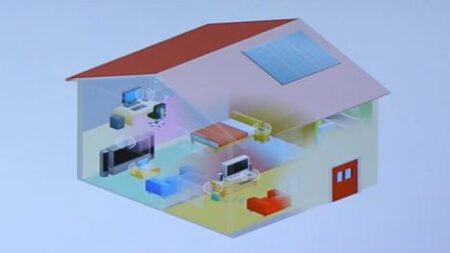
A Local Area Network (LAN) is the backbone of modern connectivity, seamlessly linking computers and devices within a confined geographic area such as an office, campus, or building. Functioning as an intricate web of interconnected nodes, a LAN enables the efficient sharing of resources, information, and services among its connected devices. This localized network infrastructure facilitates collaborative work environments, streamlined communication, and resource optimization, thereby fostering productivity and connectivity on a small-scale level. Whether in homes, businesses, or educational institutions, LANs play a pivotal role in shaping the landscape of contemporary digital communication, offering a reliable and swift means for devices to interact and exchange data within designated proximity. As technology continues to evolve, the importance of LANs remains paramount, providing the foundation for numerous applications and innovations that drive the interconnected world we inhabit today.
1.1 What is Local Area Network (LAN)?
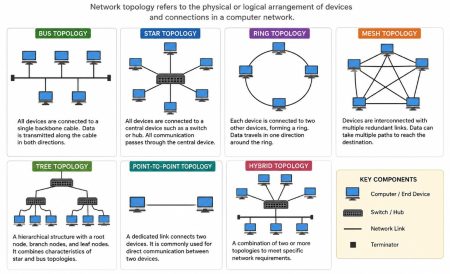
A Local Area Network (LAN) is a computer network that connects devices within a relatively small geographic area, such as a building, office, or campus. It is a communication infrastructure allowing computers, printers, servers, and storage devices to share resources and exchange information seamlessly. LANs can be established using wired technologies like Ethernet cables or wireless technologies like Wi-Fi. They are commonly used in homes, offices, schools, and other localized environments to facilitate efficient data transfer, resource sharing, and collaboration among network users. LANs are characterized by high data transfer rates, localized administration and management, the ability to share resources, and security features to protect the network and its data. Components of Local Area Network
Some key features and characteristics of LANs include:
- Limited geographic area: LANs cover a relatively small area, such as a building, office, or campus.
- High data transfer rates: LANs provide fast communication and data sharing between devices within the network.
- Shared resources: LANs allow devices to share resources like printers, storage devices, and internet connections.
- Local administration and management: LANs are managed by local administrators for maintenance, security, and user management.
- Ethernet and TCP/IP: Ethernet is the common technology used for wired LAN connections, while TCP/IP is the standard protocol suite for LAN communication.
- Security measures: LANs incorporate security measures like firewalls, access control, encryption, and VPNs to protect against unauthorized access and data breaches.
LANs are crucial in facilitating local communication and resource sharing, making them essential for various applications, including home networking, office environments, educational institutions, and small to medium-sized businesses.
1.2 Using a Local Area Network (LAN) offers several benefits:
- LANs allow for efficient sharing of network resources such as printers, scanners, and storage devices. Multiple users can access these resources, eliminating the need for individual devices and reducing costs.
- LANs facilitate seamless communication and collaboration among users. Users can easily share files, exchange information, and communicate through instant messaging, email, or video conferencing tools. This promotes teamwork, knowledge sharing, and efficient workflow.
- LANs provide fast data transfer rates within the network. This enables quick access to shared files, applications, and network resources, enhancing productivity and reducing delays in data transmission.
- LANs can be centrally managed, allowing administrators to monitor and control network operations efficiently. This simplifies tasks such as user management, security configurations, and software updates, improving network stability and making troubleshooting easier.
- LANs can implement security measures to protect against unauthorized access and data breaches. Firewalls, access controls, and encryption protocols can be deployed to safeguard sensitive information, ensuring the privacy and integrity of network communications.
- By sharing resources and centralizing management, LANs can result in cost savings. Organizations can reduce hardware and software expenses by utilizing shared devices and applications, and network administrators can efficiently allocate resources and monitor network usage to optimize costs.
- LANs can be easily expanded or reconfigured to accommodate changing network needs. New devices can be added, and network settings can be adjusted to adapt to growth or changes in organizational requirements.
1.3 Components of Local Area Network (LAN)
A local Area Network (LAN) is made up of three essential elements:
- Hardware Components
- Software Components; and
- The Users.
1.3.1 Hardware Components:
The hardware components of a Local Area Network (LAN) include:
- Devices: LANs connect various devices such as computers, laptops, servers, printers, switches, routers, network-attached storage (NAS) devices, and other network-enabled devices. These devices are interconnected to facilitate communication and resource sharing within the LAN.
- Network Interface Cards (NICs): Each device connected to the LAN requires a Network Interface Card or network adapter. A NIC is responsible for establishing a physical connection to the LAN. It allows the device to send and receive data packets over the network.
- Cables and Connectors: LANs use cables and connectors to establish wired connections between devices. Ethernet cables, such as Cat5e or Cat6, are commonly used. These cables provide the physical medium through which data is transmitted between devices within the LAN.
- Switches: Switches are networking devices that connect multiple devices within the LAN. They provide multiple ports to which devices can be connected using Ethernet cables. Switches manage data flow by forwarding data packets to the intended recipient device. They ensure efficient communication between devices within the LAN.
- Routers: In larger LANs or networks that require internet connectivity, routers play a vital role. Routers connect different networks, allowing data to be transmitted between the LAN and other networks or the internet. They analyze and route data packets based on the destination IP addresses.
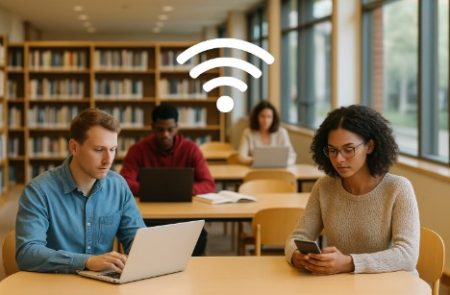
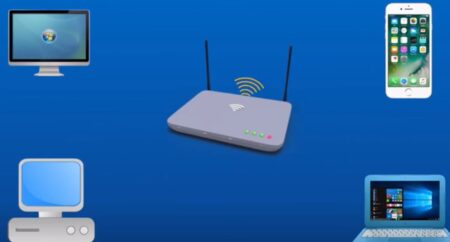
- Wireless Access Points (WAPs): In addition to wired connections, LANs can include wireless connectivity through Wireless Access Points (WAPs). WAPs enable devices to connect to the LAN wirelessly using Wi-Fi technology. They provide wireless coverage and allow devices to communicate with each other and access network resources without the need for physical cables.
- Network Cabinets and Racks: LANs often utilize network cabinets or racks to house and organize networking equipment. These cabinets provide a centralized location for devices like switches, routers, and servers, ensuring proper cable management, ventilation, and physical security.
These hardware components work together to establish the physical infrastructure of a LAN, enabling devices to communicate, share resources, and access network services within a local area.
1.3.2 Software Components:
The software components of a Local Area Network (LAN) include:
- Network Operating System (NOS): A LAN may have a dedicated network operating system installed on servers or specialized network devices. The NOS provides the foundation for managing and controlling the network. It allows administrators to configure network settings, manage user accounts, allocate resources, and provide network services such as file sharing, printing, and email.
- Network Protocols: LANs rely on network protocols to govern how data is transmitted, addressed, and managed within the network. Common LAN protocols include Ethernet for wired connections and Wi-Fi for wireless connections. TCP/IP (Transmission Control Protocol/Internet Protocol) is the fundamental protocol suite used in LANs, providing the rules and standards for data transmission and addressing.
- Network Management Software: LANs often employ network management software to monitor, control, and troubleshoot network performance and configurations. This software lets network administrators view network activity, track device status, manage network security, and analyze network traffic. It facilitates network monitoring, performance optimization, and configuration management.
- Network Security Software: LANs implement various software components to enhance network security. This includes firewalls, which control network traffic and protect against unauthorized access; antivirus software, which scans for and prevents malware; intrusion detection/prevention systems (IDS/IPS) that monitor for suspicious network activity; and encryption tools to secure data transmission over the LAN.
- Application Software: LANs support a wide range of application software that operates on devices connected to the network. This includes productivity software such as word processors, spreadsheets, presentation tools, and specialized applications for specific purposes like database management, design software, or collaboration tools. Application software enables users to perform tasks and utilize network resources efficiently.
- Network Services: LANs provide network services that enhance communication, resource sharing, and collaboration. These services can include file sharing, printing services, email, web browsing, instant messaging, video conferencing, and remote access to network resources. Network services allow users to utilize shared resources and communicate seamlessly within the LAN efficiently.
These software components work in conjunction with the hardware components of a LAN to provide a comprehensive networking environment. They enable network management, secure data transmission, support application functionality, and deliver network services to users within the local area network.
1.3.3 The Users:
The users component of a Local Area Network (LAN) refers to the individuals or entities who utilize the network to access resources, communicate, and collaborate within the LAN environment. Here are some key aspects of the users component:
- Network Users: These are the individuals or groups of people who connect their devices to the LAN. Network users can include employees within an organization, students in an educational institution, or residents in a residential community. Each user typically has a device, such as a computer or a laptop, to access the LAN.
- Network Administrator: The network administrator oversees the LAN’s operations, configurations, and maintenance. This individual or team is typically knowledgeable about network technologies and has the expertise to manage and troubleshoot network-related issues. The network administrator’s tasks can include:
i. Network Setup and Configuration: The network administrator is responsible for setting up and configuring the LAN, including installing and configuring network devices such as switches, routers, and wireless access points. They define network settings, IP addressing schemes, and network protocols.
ii. User Management: The network administrator manages user accounts, permissions, and access rights within the LAN. They create and delete user accounts, assign user roles and group memberships, and enforce security policies and restrictions.
iii. Network Security: Network administrators implement and manage network security measures to protect the LAN from unauthorized access, data breaches, and security threats. This includes setting up firewalls, implementing intrusion detection/prevention systems, managing access controls, and ensuring compliance with security policies and standards.
iv. Network Monitoring and Performance Optimization: Network administrators monitor the LAN’s performance, analyze network traffic, and identify potential issues or bottlenecks. They use network monitoring tools to detect and resolve network problems, optimize network performance, and ensure efficient data transmission within the LAN.
v. Network Maintenance and Upgrades: The network administrator performs regular maintenance tasks such as firmware updates, device configurations, and network backups. They also plan and execute network upgrades or expansions when necessary, ensuring the LAN infrastructure remains up-to-date and capable of meeting the organization’s needs.
vi. Troubleshooting and Technical Support: In the event of network issues or user connectivity problems, the network administrator troubleshoots and resolves the issues. They provide technical support to network users, diagnose network-related problems, and implement solutions to ensure smooth network operation.
A Local Area Network (LAN) is a computer network that connects devices within a localized area, such as a building or campus, facilitating efficient communication, resource sharing, and collaboration among network users. LANs comprise various components that work together to create a functional network infrastructure. The hardware components include computers, servers, switches, routers, NICs, cables, and wireless access points. These components establish physical connections, manage data transmission, and provide network connectivity. On the software side, LANs rely on network protocols, network operating systems, network management software, and security software to govern data transmission, manage network resources, monitor network performance, and ensure network security. Additionally, LANs incorporate the user component, including network users who connect their devices to the LAN, user accounts and roles, collaboration and communication tools, and network administrators who manage and maintain the LAN infrastructure. The integration of these components enables LANs to support efficient data transfer, resource sharing, secure communication, and collaboration within a localized network environment.





12 Comments
I really appreciate your effort in answering my question. I never imagine that library and information scientist can contribute too,in Nigeria those who read library and information science are regarded or respected.
very nice information and good skill behind work Thanks u bother iam Umar new Qamar for networking
Very nice information and good skill behind work Thank you bother iam pooja new Qamar for networking
I got help here I appreciate a lot
I really appreciate your effort God bless
I really appreciate your effort God bless you
What are the important thing needed when installing locol area network
I think you should make this more summarised for readers please.
Thank you.
Looking for Lan Materials for sale
I want to use 10 to 15 laptops.at a time.Should I need a LAN ?
So helpful ,I am so happy for this commendable task…..
This article provides a concise and clear breakdown of the essential components of a Local Area Network (LAN), making it easy to understand how each part plays a crucial role in the network’s overall functionality. The explanation of devices, switches, routers, and cabling highlights the interconnected nature of LAN infrastructure, while the mention of wireless components like access points emphasizes the growing demand for flexible and mobile network solutions. The article does an excellent job of illustrating both wired and wireless LAN setups, ensuring readers can grasp the full scope of modern networking needs. A great resource for anyone looking to better understand how LANs operate and how to optimize their own network setups.