A Local Area Network, commonly abbreviated as LAN, is a fundamental component of modern networking that serves as a localized digital nexus connecting computers, devices, and resources within a limited geographical area, such as a home, office building, or campus. LANs facilitate seamless communication, resource sharing, and data transfer among connected devices, promoting efficient collaboration and streamlined information exchange. By utilizing various wired or wireless technologies, LANs have become the cornerstone of efficient information flow in personal and professional settings, enabling users to easily access shared files, printers, applications, and other networked services.
1.1 What is a LAN?
A Local Area Network (LAN) is a network of interconnected computers, devices, and equipment within a specific geographic area, typically confined to a single building, campus, or closely situated group of buildings. LANs facilitate efficient communication and resource sharing among these connected devices. By utilizing various networking technologies such as Ethernet, Wi-Fi, and switches, LANs allow users to share files, printers, applications, and other resources and enable real-time collaboration and data exchange. LANs play a crucial role in both personal and professional settings, providing a foundation for effective local communication and data management.
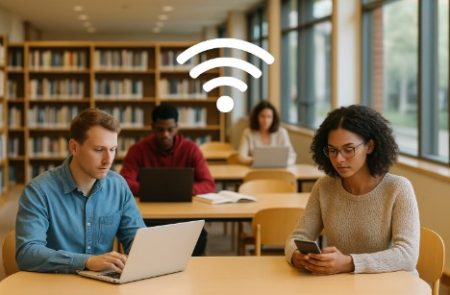
At their core, LANs are networks of interconnected devices that utilize various communication technologies to establish a digital community within a limited physical space. Wired LANs employ Ethernet cables and switches to establish connections, while wireless LANs use Wi-Fi signals to link devices without physical cables. Each device connected to the LAN is assigned a unique identifier, such as an IP address, enabling seamless data transfer and communication. The central hub of a LAN, often a router or switch, manages traffic flow and ensures efficient connectivity.
1.2 How do LANs work?
Local Area Networks (LANs) work by establishing a network infrastructure that enables devices within a limited geographical area to communicate and share resources efficiently. The basic functioning of a LAN involves several key components and processes:
- Devices and Endpoints: A LAN consists of various devices, such as computers, laptops, smartphones, printers, servers, and more, all interconnected through wired or wireless connections.
- Networking Hardware: The heart of a LAN is the networking hardware that facilitates communication. This hardware includes routers, switches, access points, and network cables (in wired LANs) or wireless transmitters (in wireless LANs).
- Data Transmission:
- Wired LANs: In wired LANs, devices are connected to switches or hubs through Ethernet cables. When one device wants to communicate with another, it sends data packets over the network cables to the switch, which then forwards the packets to the intended recipient.
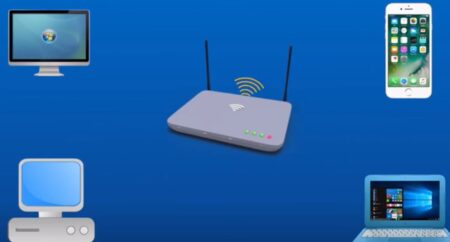
- Wireless LANs: Wireless LANs use radio waves to transmit data. Devices connect to the LAN through Wi-Fi access points. When data needs to be sent, devices convert it into packets and transmit them using radio signals. Access points receive these signals, relay the packets, and manage the communication flow.
- Network Protocols and Addresses:
- IP Addresses: Each device on a LAN is assigned a unique IP address (IPv4 or IPv6) that identifies it within the network.
- MAC Addresses: Devices also have a Media Access Control (MAC) address, a unique hardware address associated with their network interface. MAC addresses are used at the data link layer for communication within the LAN.
- Data Routing and Switching:
- Switches: In a LAN, switches play a crucial role. They examine the MAC addresses of incoming data packets and determine which device they should be forwarded to. This process is more efficient than hubs, as switches only send data to the relevant device instead of broadcasting it to all devices on the network.
- Routers: Routers connect different LANs or LAN segments. They direct data traffic between LANs and route data between devices on different subnets or networks.
- Data Communication:
- Data Transmission: When a device wants to communicate with another device on the LAN, it encapsulates the data it wants to send into packets.
- Addressing: The source and destination IP and MAC addresses are included in the packet headers.
- Packet Forwarding: Switches or routers forward the packets through the network based on MAC addresses, while routers also use IP addresses to determine the best path between different networks.
- Data Reception:
- Data Processing: When a device receives a data packet, it checks the destination MAC address. If the packet is meant for that device, it processes the data; otherwise, it ignores the packet.
- Resource Sharing: LANs allow devices to share resources such as files, printers, and applications. These shared resources are typically hosted on a server or a central device that’s accessible to other devices on the network.
- Network Management and Security:
- Security Measures: LANs implement security measures like firewalls, intrusion detection systems, and encryption to protect against unauthorized access and data breaches.
- Network Management: LANs may be managed using various tools and software to monitor traffic, manage IP addresses, configure devices, and ensure optimal network performance.
LANs create a network environment where devices can communicate by exchanging data packets. LANs enable efficient data transfer, resource sharing, and collaboration within a localized area through hardware, protocols, and addressing mechanisms.
1.3 What equipment is needed to set up a LAN?
Setting up a Local Area Network (LAN) requires various equipment to facilitate communication and resource sharing among connected devices. The specific equipment you need can vary based on the size and complexity of the network, as well as whether you’re establishing a wired or wireless LAN. Here’s a general list of equipment needed for both types of LAN setups:
Wired LAN:
- Router: A router serves as the central hub of the network. It manages data traffic between devices within the LAN and connects to the wider network, such as the Internet.
- Switches: Switches enable efficient communication between devices within the LAN. They direct data packets to their intended recipients based on MAC addresses.
- Ethernet Cables: Ethernet cables connect devices to switches and routers. They come in various categories (e.g., Cat 5e, Cat 6) with different speeds and capabilities.
- Network Interface Cards (NICs): NICs are hardware components that allow devices (such as computers) to connect to the network. Most modern devices have built-in NICs.
- Patch Panels: Patch panels organize and manage the connections between devices and switches. They provide a centralized point for connecting and labeling cables.
- Rack or Enclosure: A rack or enclosure can house and organize networking equipment for larger setups, making maintenance and management more effortless.
- Cable Management Tools: These tools help keep cables organized and prevent clutter, ensuring better airflow and easier maintenance.
Wireless LAN:
- Wireless Router or Access Points (APs): In wireless LANs, a router with built-in wireless capabilities or dedicated access points provides Wi-Fi connectivity to devices.
- Router: If you’re setting up a wireless LAN, you still need a router to manage data traffic and provide a connection to the internet.
- Network Interface Cards (NICs): Devices connecting wirelessly need Wi-Fi NICs. Most laptops, smartphones, and tablets have built-in Wi-Fi capabilities.
- SSID and Security Settings: You’ll need to set up the network’s Service Set Identifier (SSID), and the network’s name and configure security settings such as encryption (WPA2/WPA3) and a Wi-Fi password.
- Wireless Controllers (for larger setups): In larger wireless LANs, wireless controllers can centrally manage and configure multiple access points.
- Site Survey Tools: These tools help you identify areas with strong and weak Wi-Fi signals, enabling optimal access point placement.
Additional Equipment for Both Wired and Wireless LANs:
- Modem: If your LAN needs internet connectivity, a modem must establish a connection with your Internet Service Provider (ISP).
- Server (Optional): In more complex LANs, a dedicated server might host shared resources, manage user accounts, and provide additional services.
- Firewall and Security Appliances: To ensure network security, firewalls and security appliances can be employed to protect against unauthorized access and cyber threats.
- Uninterruptible Power Supply (UPS): A UPS provides backup power in case of electrical outages, ensuring network continuity.
- Network Monitoring Tools: These tools help you monitor and manage network traffic, diagnose issues, and ensure optimal performance.
Setting up a LAN requires careful planning, configuration, and consideration of the equipment needed to meet your networking goals and requirements.
1.4 The benefits of using LAN:
In an era of digital interconnectivity, Local Area Networks (LANs) emerge as the unsung heroes that have revolutionized how we communicate, collaborate, and share resources within limited geographical spaces. From homes to offices, schools to libraries, the benefits of LANs permeate our daily lives, shaping efficiency, productivity, and innovation. Using a Local Area Network (LAN) offers numerous benefits that enhance communication, collaboration, and resource sharing within a limited geographic area. Here are some key advantages of using LANs:
- Efficient Resource Sharing and Collaboration: One of the foremost benefits of LANs lies in their ability to foster seamless resource sharing and collaboration. In business, LANs enable employees to share files, documents, and data effortlessly, eliminating the need for physical transfers. Collaborative projects are streamlined through real-time document editing and instant communication tools, making teamwork more effective and efficient. Similarly, in educational institutions, LANs empower teachers and students to exchange materials, engage in e-learning, and collaborate on assignments, enhancing the learning experience.
- Fast and Reliable Data Transfer: LANs provide high-speed and reliable data transfer capabilities. Whether it’s transferring large files, streaming multimedia content, or accessing cloud-based applications, LANs minimize latency and offer rapid data transmission within the network. This swiftness is particularly advantageous when time-sensitive actions are essential, such as video conferencing, online gaming, and remote server access.
- Cost-Effective Infrastructure: LANs offer a cost-effective alternative to individualized networking solutions for each device. LANs reduce the need for various internet connections and resources by connecting multiple devices to a single network infrastructure. This lowers operational costs and simplifies network maintenance and troubleshooting, as issues can be addressed centrally.
- Enhanced Security and Data Control: The localized nature of LANs contributes to heightened security and data control. LANs can be secured with firewalls, encryption, and access controls, providing a protective shield against unauthorized access and cyber threats. Critical data remains within the confines of the LAN, reducing exposure to external risks associated with wide area networks (WANs).
- Centralized Backup and Data Management: LANs enable centralized backup and data management, ensuring that valuable information is safeguarded and easily recoverable. Network administrators can implement regular backups of data stored on servers, minimizing the risk of data loss due to hardware failures or accidents.
- Support for Networked Services: LANs lay the foundation for providing networked services. From shared printers to centralized databases, LANs allow devices to access and utilize shared resources efficiently. This promotes operational efficiency and reduces the need for redundant equipment.
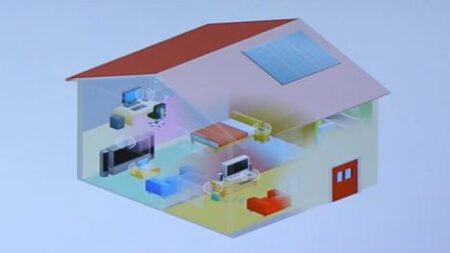
- Seamless Integration of Internet of Things (IoT) Devices: As the Internet of Things expands, LANs play a pivotal role in seamlessly integrating IoT devices into our lives. Intelligent appliances, wearable technology, and automated systems can all connect to a LAN, creating a cohesive ecosystem that enhances convenience and accessibility.
Local Area Networks are cornerstones of modern connectivity, offering myriad benefits that transcend industries and contexts. Their capacity to foster efficient communication, resource sharing, and collaboration has reshaped the way we interact with technology and each other. As LANs continue to evolve and adapt to the changing digital landscape, their advantages will undoubtedly play a pivotal role in shaping the future of interconnected societies.
1.5 What are the Basic Layouts of Local Area Networks?
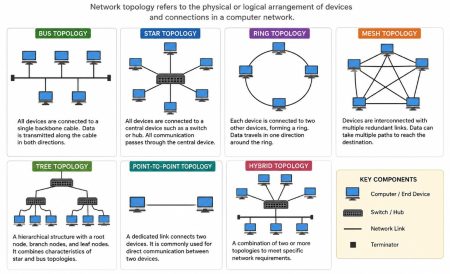
Local Area Networks (LANs) can be organized into various layouts or topologies, each with its characteristics and advantages. The basic layouts or topologies of LANs include:
- Star Topology: In a star topology, all devices are connected to a central hub, switch, or router. This central device acts as a central control point, managing data traffic between devices. If one device fails, it doesn’t affect the rest of the network. However, the failure of the central device can disrupt the entire network.
- Bus Topology: In a bus topology, devices are connected linearly along a single communication line, often a coaxial cable. Data sent by one device travels along the cable and is received by all devices on the network. This topology is simple but susceptible to disruptions if the main cable is damaged or disconnected.
- Ring Topology: In a ring topology, devices are connected in a circular loop, and data travels in a unidirectional manner. Each device receives data and passes it along until it reaches its intended recipient. While it’s less susceptible to collisions than a bus topology, the failure of a single device or connection can disrupt the entire ring.
- Mesh Topology: A mesh topology is characterized by direct connections between each device on the network. There are two types:
- Full Mesh: Every device is connected to every other device. This offers redundancy and fault tolerance but can be costly and complex.
- Partial Mesh: Only some devices are connected to others. This reduces complexity and cost but might sacrifice some redundancy.
- Tree Topology: Also known as a hierarchical topology, the tree topology combines elements of both star and bus topologies. It features multiple star-configured networks connected to a main bus backbone. This layout suits larger networks as it offers scalability while maintaining centralized control.
- Hybrid Topology: A hybrid topology combines two or more basic topologies. For example, you could have a combination of star and ring topologies. This allows network designers to tailor the topology to the specific needs of different network parts.
Each topology has its advantages and considerations. The choice of topology depends on factors such as the size of the network, the level of redundancy required, the ease of management, and the cost constraints. As technology advances, virtual LANs (VLANs) and software-defined networking (SDN) have introduced more flexibility in organizing LANs, allowing network administrators to configure and manage networks dynamically and innovatively.