What is Library Management Software, and Why Is It Essential for Modern Libraries?
Library Management Software (LMS) is an integrated digital system designed to automate and manage the day-to-day operations of a library through a single, unified platform. It supports essential library functions such as cataloguing, circulation, acquisitions, serials management, user administration, and reporting. For example, when a new book is added to the library, LMS allows librarians to create a standardized bibliographic record, assign a call number, and make the item instantly searchable through the Online Public Access Catalogue (OPAC). Similarly, during circulation, issuing and returning books are handled electronically-due dates are set automatically, fines are calculated by the system, and transaction histories are stored accurately without manual record-keeping. These automated processes significantly reduce human error and save staff time.
Library Management Software is essential for modern libraries because it enables efficient service delivery in both physical and digital environments. For instance, a student can search the OPAC from home, check whether a required textbook is available, place a reservation, and later collect it from the circulation desk. In academic libraries, LMS supports faculty and researchers by managing journal subscriptions, tracking usage statistics, and generating reports that guide collection development decisions. From an administrative perspective, library managers can use LMS-generated reports—such as most-issued books, subject-wise usage, or overdue statistics—to evaluate user demand and improve services. In large or multi-floor libraries, LMS also integrates with technologies like barcodes or RFID to enable self-check machines and automated book return systems.
How Does Library Management Software Improve Operational Efficiency in Libraries?
Library Management Software (LMS) significantly improves operational efficiency in libraries by automating routine tasks and integrating multiple library functions into a single, centralized system. Traditionally, activities such as book issuing, returning, fine calculation, and record maintenance required extensive manual effort and were prone to errors. With LMS, these processes are handled automatically—transactions are completed within seconds, due dates are assigned instantly, and overdue fines are calculated without staff intervention. For example, when a user borrows or returns a book, the system updates the item status and user record in real time, ensuring accuracy and reducing repetitive workload for library staff.
Operational efficiency is further enhanced through improved workflow management and better use of library resources. LMS streamlines cataloguing, acquisitions, and serials control by maintaining consistent bibliographic records and tracking orders, budgets, and subscriptions digitally. This allows librarians to monitor collection growth, avoid duplicate purchases, and manage journal renewals more effectively. Additionally, LMS-generated reports and analytics—such as circulation statistics, peak usage times, and subject-wise demand—support informed decision-making and strategic planning. By reducing manual processes, minimizing errors, and providing timely operational insights, Library Management Software enables libraries to deliver faster services, optimize staff productivity, and focus more on user support and knowledge-based activities rather than administrative tasks.
What Are the Core Modules of a Standard Library Management System?
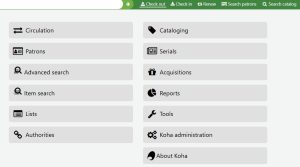 A standard Library Management System (LMS) comprises several interconnected modules, each designed to handle a specific functional area of library operations. These modules work together to automate workflows, maintain data consistency, and enhance both staff efficiency and user satisfaction. Below is a detailed, paragraph-style discussion of the core modules commonly found in a modern library management system.
- Acquisition Module: The acquisition module manages the entire lifecycle of library materials from selection to procurement. It supports activities such as requesting new resources, evaluating user and faculty recommendations, placing purchase orders, tracking deliveries, and managing vendor information. This module also plays a critical role in budget management by recording costs, monitoring expenditure against allocated funds, and generating financial reports. For example, in an academic library, the acquisition module helps librarians plan textbook purchases for each semester while ensuring spending stays within budget and that duplicate resources are avoided.
- Cataloguing Module: The cataloguing module is responsible for organizing and describing library resources in a standardized and searchable manner. Librarians use this module to create bibliographic records, assign classification numbers, add subject headings, and attach metadata such as author names, publication details, and keywords. By following international standards and classification schemes, the cataloguing module ensures consistency across the collection. Accurate cataloguing directly improves resource discovery, as users rely on these records when searching the OPAC to locate books, journals, and other materials efficiently.
- Circulation Module: The circulation module handles the daily lending operations of the library, including issuing, returning, renewing, and reserving materials. It automatically enforces library policies, including loan periods, borrowing limits, and overdue item fines. This module updates item and user records in real time, reducing manual errors and speeding up service at circulation desks. For instance, when a user returns a book late, the system immediately calculates the fine and updates the user’s account, ensuring transparency and consistency in service delivery.
- Online Public Access Catalogue (OPAC): OPAC serves as the primary interface between the library and its users. It allows patrons to search the library’s collection by title, author, subject, or keywords and to check real-time availability of materials. Beyond searching, OPAC often enables users to place reservations, renew borrowed items, and view their borrowing history. By providing 24/7 access to library holdings, OPAC extends library services beyond physical boundaries, significantly enhancing user convenience and accessibility.
- Serials Management Module: The serials management module is designed to control periodical publications such as journals, magazines, and newspapers. It tracks subscription details, publication frequency, renewal dates, and receipt of individual issues. This module helps librarians identify missing or delayed issues and manage subscription budgets efficiently. In research and academic libraries, where journals are a critical resource, the serials module ensures continuity of access and systematic control over both print and electronic serials.
- User Management Module: The user management module maintains comprehensive records of library members, including students, faculty, researchers, and staff. It stores personal information, membership categories, borrowing privileges, and transaction histories. Different user groups can be assigned different access rights and circulation rules through this module. For example, faculty members may be allowed longer loan periods than students. This module ensures that library policies are applied fairly and consistently across all user categories.
- Reports and Statistics Module: The reports and statistics module transforms library data into meaningful information for evaluation and decision-making. It generates various reports, such as circulation statistics, most-used materials, overdue items, and acquisition summaries. These reports help library administrators assess service performance, identify user demand patterns, and plan future collection development. By relying on data-driven insights, libraries can improve resource utilization and justify budget allocations more effectively.
- Administration and System Configuration Module: The administration and system configuration module provides control over the overall functioning of the library management system. It allows administrators to define library policies, set circulation rules, manage user roles, and configure system preferences. This module also handles system security, backups, and maintenance tasks. By ensuring that the LMS operates according to institutional requirements, the administration module plays a vital role in maintaining system reliability, data integrity, and long-term sustainability.
Each core module of a Library Management System contributes to the smooth and efficient operation of library services. When integrated effectively, these modules reduce manual workloads, improve accuracy, and enhance user experience. Together, they form the technological backbone of modern libraries, enabling them to manage resources efficiently while meeting the evolving needs of their users.
How Does a Library Management System (LMS) Integrate RFID, Barcode, and Self-Check Technologies?
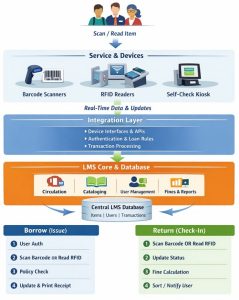 A modern Library Management System (LMS) integrates RFID, barcode, and self-check technologies to automate circulation workflows, enhance service speed, and improve overall operational control. These technologies work closely with the LMS database, ensuring that every transaction—whether performed by staff or users—is recorded accurately and in real time. Their integration transforms traditional, staff-intensive library operations into efficient, user-friendly, and technology-driven services.
Barcode technology is usually the first level of automation integrated with an LMS. Each library item and user ID card is assigned a unique barcode that links directly to the LMS record. When a barcode is scanned during issuing or returning, the LMS instantly retrieves item and user details, updates loan status, assigns due dates, and records transactions. This integration reduces manual data entry, minimizes errors, and speeds up circulation desk operations. Even today, barcode systems remain widely used due to their low cost, simplicity, and reliability.
RFID (Radio Frequency Identification) integration takes automation a step further by enabling faster, contactless transactions. In an RFID-enabled library, each book contains an RFID tag that encodes item information corresponding to the LMS database. RFID readers installed at circulation desks, self-check kiosks, security gates, and book drop boxes communicate directly with the LMS. When multiple books are placed on an RFID reader, the system can issue or return all items simultaneously—something not possible with barcode scanning. The LMS updates item status instantly, enhances inventory control, supports theft detection, and enables rapid stock verification, significantly improving efficiency in large or high-traffic libraries.
Self-check technologies are user-facing systems that tightly integrate with LMSs and rely on either barcode or RFID infrastructure. Self-check kiosks allow users to issue, renew, and return books independently by authenticating themselves with a library card and scanning items. Once the transaction is completed, the self-check machine communicates with the LMS in real time to update circulation records, adjust item status, and apply loan rules. This integration reduces queues at circulation desks, empowers users with greater autonomy, and allows library staff to focus on advisory and academic support services rather than routine transactions.
Together, the integration of RFID, barcode, and self-check technologies with LMS creates a seamless automation ecosystem. The LMS acts as the central control system, while these technologies serve as operational tools that execute transactions efficiently. This integrated approach not only improves service speed and accuracy but also supports modern library expectations for self-service, security, and data-driven management—making it a cornerstone of smart, digital library environments.
How Does Library Management Software Enhance User Experience and Accessibility?
Library Management Software (LMS) significantly enhances user experience and accessibility by transforming how users discover, access, and interact with library resources. In a traditional manual environment, users often relied on staff assistance and physical visits to locate materials or manage borrowing activities. LMSs remove many of these barriers by providing digital, user-friendly platforms that enable users to engage with library services independently. Through automation and centralized data management, LMS ensures that services are faster, more accurate, and more responsive to user needs.
One of the most important contributions of LMS to user experience is improved access to library collections through the Online Public Access Catalogue (OPAC). Users can search for books and other materials by title, author, subject, or keywords and instantly see real-time availability status. This eliminates uncertainty and saves users time, especially in large academic libraries. By offering clear, consistent search results, LMS empowers users to find information efficiently without extensive guidance.
LMS also enhances accessibility by enabling remote and 24/7 access to essential library services. Users can log in to their accounts from any location to renew books, place reservations, check due dates, and review borrowing histories. This flexibility is particularly beneficial for students, researchers, and faculty members who may not always be able to visit the library during service hours. As a result, library services become more inclusive and adaptable to diverse user schedules and needs.
Personalized services further improve the user experience. LMS supports different user categories with customized borrowing privileges, loan periods, and access rights. Automated notifications and alerts—such as reminders for due dates, overdue items, or reserved material availability—help users manage their library use effectively and avoid penalties. These system-generated interactions create a sense of responsiveness and reliability, strengthening users’ trust in library services.
Overall, library management software enhances user experience and accessibility by making library services more convenient, flexible, and user-centered. By reducing physical and procedural barriers, supporting self-service options, and providing consistent access to information, LMS ensures that modern libraries remain accessible, efficient, and responsive to their users’ evolving expectations.
Examples of Popular Library Management Software (LMS)
Library Management Software (LMS) solutions vary in features, cost, and flexibility, allowing libraries to choose systems that best match their size, budget, and service requirements. Below are some widely used and well-recognized LMS platforms, discussed with key characteristics and typical use cases.
- Koha: Koha is one of the most popular open-source library management systems used worldwide. It offers comprehensive modules for acquisitions, cataloguing, circulation, serials management, OPAC, and reporting. Because it is open source, libraries can customize the system according to their local needs without vendor lock-in. Koha is especially popular among academic, public, and special libraries that seek cost-effective automation with strong community support and flexibility.
- Evergreen: Evergreen is another open-source LMS, originally developed for large-scale library consortia. It is designed to handle high transaction volumes and multi-branch library environments efficiently. Evergreen provides robust circulation, cataloguing, and OPAC features, making it suitable for public library networks and shared library systems where multiple libraries operate under a single platform.
- Alma: Alma is a cloud-based, proprietary library services platform widely used by academic and research libraries. It supports the management of both print and electronic resources within a unified workflow. Alma integrates acquisitions, metadata management, circulation, analytics, and electronic resource management, making it particularly effective for libraries with extensive digital collections and complex subscription management needs.
- Sierra: Sierra is a commercial integrated library system designed for academic, public, and special libraries. It provides strong functionality for circulation, cataloguing, serials, and reporting, along with a flexible architecture that supports customization and integration with third-party systems. Sierra is often chosen by libraries seeking a stable, enterprise-level solution with professional vendor support.
- Symphony: Symphony is a well-established proprietary LMS used by libraries of various types, including large academic and national libraries. It offers comprehensive modules covering all core library operations and supports advanced reporting and analytics. Symphony is known for its scalability, reliability, and ability to support complex library workflows.
- WorldShare Management Services (WMS): WorldShare Management Services is a cloud-based LMS designed to integrate library management with global bibliographic data and discovery tools. It enables libraries to manage print, electronic, and digital resources efficiently while benefiting from shared metadata and cooperative cataloguing. WMS is commonly adopted by academic libraries that value collaborative resource sharing and streamlined workflows.
Popular Library Management Software solutions differ in terms of licensing models, deployment methods, and functional focus. Open-source systems like Koha and Evergreen offer flexibility and cost savings, while proprietary platforms such as Alma, Sierra, Symphony, and WMS provide advanced features, cloud-based services, and dedicated vendor support. Understanding these examples helps libraries make informed decisions when selecting an LMS that aligns with their operational goals, user needs, and long-term sustainability.